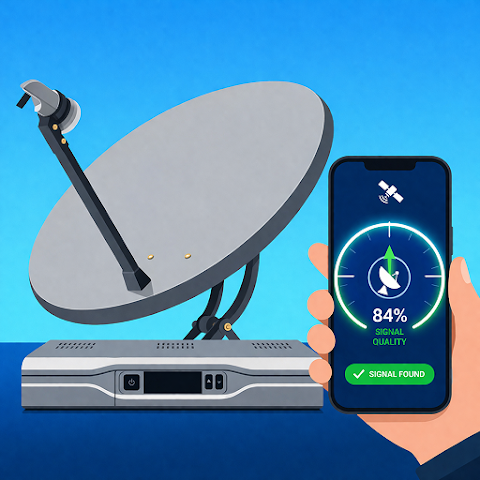
There’s a unique frustration that comes with setting up a satellite dish. You stand on a rooftop, slowly rotating a heavy piece of metal by millimeters, while running back and forth to check a tiny signal meter on a TV screen inside. It’s a tedious, time-consuming dance of guesswork and patience that can turn a simple installation into an afternoon-long ordeal. Enter Dish Finder: Satellite Director, an application that aims to replace that frustration with the pinpoint accuracy of modern smartphone technology. This isn't just a digital compass; it's a sophisticated toolkit that transforms your phone into a professional satellite alignment system.
Developed by Deep Spark Ltd, this app is designed to be the ultimate solution for anyone needing to set up or fine-tune a satellite antenna. Whether you're a professional installer looking to streamline your workflow, a homeowner dealing with a storm-damaged dish, or an RV enthusiast setting up camp in a new location, the app promises to make the process quick, simple, and incredibly precise. It leverages the power of augmented reality (AR), GPS, and built-in sensors to guide you, making the invisible signals of space visible and tangible on your screen.
The Core Features: A Toolkit for Signal Success
The application packs a comprehensive suite of tools into a single, user-friendly interface. Its primary function is to use your device’s hardware to calculate the exact azimuth and elevation angles required for your dish to lock onto a specific satellite. However, it goes far beyond simple number crunching.
Here’s a look at what makes this app a standout tool:
- Real-Time Satellite Tracking: The app uses your location to show you exactly where satellites are positioned in the sky at that very moment.
- Built-in Digital Compass: An integrated compass provides precise directional guidance, ensuring you are pointing your dish in the exact right direction.
- Augmented Reality (AR) View: This is perhaps the most powerful feature. The app overlays satellite positions directly onto your phone's camera view, creating a 3D map of the sky. You can literally see where the satellite is and aim your dish accordingly.
- GPS-Based Dish Finder: By utilizing your GPS coordinates, the app calculates the optimal angles for your specific location, eliminating guesswork.
- Auto Azimuth and Elevation Calculation: The app automatically computes the complex mathematical calculations, providing clear horizontal and vertical angles for perfect calibration.
- Real-Time Earth Maps: For better situational awareness, the app provides interactive maps in hybrid, terrain, and satellite modes.
Augmented Reality: Seeing is Believing
The standout feature of Dish Finder is its seamless integration of augmented reality. In the traditional setup, you’re working with abstract numbers and angles. This app changes the game by allowing you to point your phone at the sky and see the exact locations of satellites overlaid on the live camera feed. This visual guide is incredibly intuitive; instead of interpreting a compass bearing, you see a digital marker hovering in the sky that you can aim your dish directly at. This feature is particularly helpful for overcoming physical obstacles like trees or buildings, as you can visually see if a satellite is blocked and adjust your setup accordingly.
Accurate Navigation and Visualization
Beyond the AR view, the app provides all the traditional tools necessary for a precise installation. The in-app digital compass provides stable, accurate readings, and the automated calculation of azimuth and elevation takes all the complex math out of the equation. The app even compensates for magnetic declination, ensuring the compass readings are true. This combination of advanced and fundamental tools means that even a complete novice can confidently set up a dish by simply following the on-screen prompts.
Setting Up is Simple: A Quick Step-by-Step Guide
The beauty of the app is how it simplifies a complex task. The setup process is designed to be straightforward and stress-free:
- Enable Location Services: The first step is to turn on GPS and network location to allow the app to accurately pinpoint your position.
- Select Your Target Satellite: From the app's database, choose the specific satellite you are trying to align with.
- Follow the Visual Guide: The app will instantly calculate and display the required azimuth and elevation. You can then use the compass view or, even better, the live AR view to physically adjust your dish.
- Fine-Tune for Best Signal: As you make minor adjustments, the app helps you zero in on the strongest possible signal.
Designed for Everyone, from Novices to Experts
The app’s design philosophy is inclusive. For the professional installer, it offers a fast, efficient, and highly accurate toolset that can streamline multiple installations in a single day. For the home user, it demystifies the process, removing the intimidation factor. The intuitive interface, driven by visual cues and AR, means you don't need to understand the technicalities of satellite positioning to achieve a perfect result. The addition of a Biss key finder for accessing encrypted channels also adds a layer of functionality for more advanced users.
User Feedback and Privacy
The app holds a respectable 3.9-star rating, with users generally appreciating its functionality. While it has fewer ratings than some mainstream apps, it serves a very specific niche. On the privacy front, the developer states that while the app may share device IDs with third parties, it claims that no personal data is actively collected. Data is also said to be encrypted in transit, providing some reassurance about security. However, the "data cannot be deleted" statement is something potential users should be aware of. As with any app that uses GPS and camera permissions, it’s wise to review these privacy policies.
Conclusion: Your Ticket to a Perfect Connection
Dish Finder: Satellite Director is a clear example of how smartphone technology can turn a once-frustrating chore into a simple, even enjoyable, task. By replacing guesswork with visual, AR-guided precision, it effectively puts a professional satellite alignment tool in the palm of your hand. Whether you're battling a weak signal, setting up for the first time, or just want a reliable tool for future adjustments, this app is a powerful and innovative companion. If you’ve ever wrestled with a dish and lost, this app will have you locked onto your favorite satellite in minutes.